
The Ultimate Image Optimization Guide for WordPress (EWWW, WebP, AVIF, Lazyload)


Why Image Optimization Is Critical for WordPress Performance
Images are the largest contributors to page weight on most WordPress websites. Even when everything else is optimized — hosting, caching, CDN, base de datos — unoptimized images can completely destroy Core Web Vitals, especially LCP (Pintura con contenido más grande) y CLS (Cumulative Layout Shift).
This is why many WordPress sites show hundreds of impressions in Google Search Console for image-related queries, but receive almost no clicks. Slow image delivery, layout shifts, unsupported formats, or broken previews (for example, WebP images shared on WhatsApp) all reduce user engagement and trust.
Proper image optimization is not just about compression. It involves choosing the right format, serving the correct size, controlling lazy loading behavior, and ensuring compatibility across browsers, messengers, and social platforms.
Common Image Optimization Mistakes in WordPress
Many WordPress sites repeat the same errors:
Uploading images larger than the maximum display size
Relying only on JPEG or PNG
Lazy loading the LCP image
Not defining image dimensions, causing layout shifts
Serving WebP or AVIF without fallbacks
Breaking previews in WhatsApp, Facebook, or email clients
Fixing these issues alone can significantly improve user experience and organic CTR.
WebP vs AVIF: Which Format Should You Use?
Modern image formats exist to solve the problem of large image sizes, but they are not equal.
WebP
WebP is widely supported by modern browsers and provides strong compression with good visual quality. It is currently the safest default choice for WordPress.
Pros:
Supported by all major browsers
Good balance between quality and size
Compatible with most WordPress plugins and CDNs
Cons:
Slightly larger than AVIF in many cases
AVIF
AVIF offers the best compression available today, often reducing image size by 20–40% compared to WebP.
Pros:
Extremely small file sizes
Excellent image quality at low bitrates
Cons:
Slower encoding
Limited support in older browsers
Frequent issues with social sharing and messengers
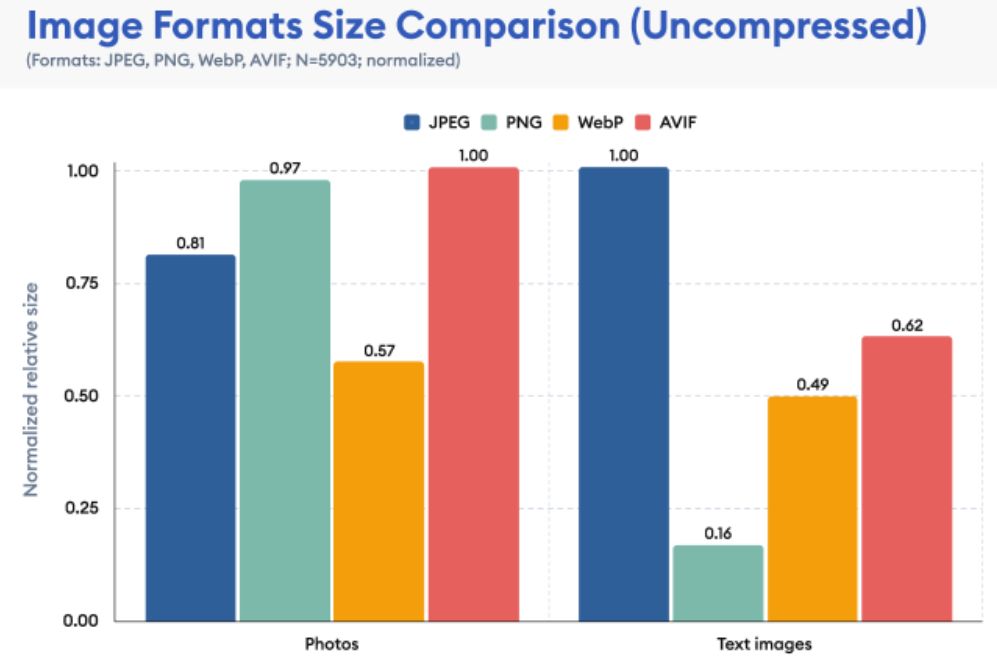
Real Comparison: JPEG vs WebP vs AVIF
Example image (hero image, 1920px width):
JPEG: 420 KB
WebP: 160 KB
AVIF: 95 KB
While AVIF wins in size, WebP often delivers a better balance between performance and compatibility.
The WhatsApp Problem: Why WebP Breaks Image Previews
One of the most common real-world issues we see is broken image previews in WhatsApp when sites use WebP or AVIF exclusively.
WhatsApp does not reliably render WebP or AVIF when images are used in Open Graph meta tags. If your site serves only WebP, the preview may show a blank image or fail entirely.
Best practice to fix this:
Always use JPEG o PNG para
og:imageServe WebP/AVIF only via
<picture>or server-side conversionKeep social previews separate from frontend optimization
This single fix often restores previews instantly and improves click-through rates from shared links.
Choosing the Right Plugin: EWWW vs Others
Optimizador de imágenes EWWW is one of the most flexible tools for WordPress image optimization.
Recommended EWWW settings:
Enable WebP generation
Disable AVIF unless your audience uses modern browsers
Enable automatic resizing on upload
Use fallback images for unsupported browsers
Other plugins like ShortPixel or Imagify also work well, but the key is correct configuration, not the plugin itself.
Lazy Loading: Powerful but Dangerous if Misused
Lazy loading is essential, but applying it incorrectly is one of the fastest ways to destroy LCP scores.
Never lazy load:
Hero image
Featured image above the fold
Logo in the header
Always lazy load:
Images below the fold
Gallery images
Blog content images
Correct lazy loading improves performance without harming perceived speed.
Preventing CLS with Proper Image Dimensions
CLS often comes from images loading without predefined dimensions.
Best practices:
Always set width and height attributes
Avoid CSS resizing without aspect ratio
Use responsive image sizes (
srcset)
This ensures that the browser reserves the correct space before the image loads.
Responsive Images and srcset
WordPress automatically generates multiple image sizes, but many sites fail to use them correctly.
Make sure:
Large desktop images are not served to mobile users
srcsetis enabled and functionalImages are not scaled down by CSS unnecessarily
Serving the correct image size alone can reduce image payload by 50–70%.
Image Optimization and LCP Improvements
In most real SpeedWP Pro cases:
LCP improves by 0.8–1.5 seconds after image optimization
Mobile performance gains are more significant than desktop
CLS issues are often resolved without touching JavaScript
Images are often the easiest and most impactful optimization target.
Real Case Example from SpeedWP Pro
Client site issues:
High impressions, low CTR
Broken WhatsApp previews
LCP above 4 seconds
What we fixed:
Converted frontend images to WebP
Kept JPEG for Open Graph
Disabled lazy loading for hero images
Defined image dimensions
Resultados:
LCP reduced from 4.2s to 2.1s
WhatsApp previews restored
Organic CTR increased within two weeks
FAQ: Image Optimization in WordPress
Should I use WebP or AVIF for WordPress images?
For most WordPress sites, WebP is the safest and most practical choice. It offers strong compression, wide browser support, and works well with CDNs and caching plugins. AVIF can reduce file size further, but it may cause compatibility issues and slower encoding, especially on shared hosting.
Why do images break when sharing links on WhatsApp?
WhatsApp does not reliably support WebP or AVIF in Open Graph images. If your og:image points to a WebP or AVIF file, the preview may fail. The correct solution is to use JPEG or PNG for Open Graph metadata and serve WebP or AVIF only on the frontend.
Should I lazy load all images?
No. Lazy loading the main hero image or featured image above the fold can significantly hurt LCP scores. Lazy loading should be applied only to images below the fold, galleries, and long-form content images.
Does image optimization help SEO directly?
Yes. Optimized images improve page speed, reduce CLS, improve LCP, and enhance mobile usability. All of these factors influence rankings and click-through rates, especially for image-heavy pages.
Is an image optimization plugin enough?
Plugins help, but correct configuration matters more than the plugin itself. Without proper format selection, fallbacks, and lazy loading rules, even the best plugin can harm performance.
Image optimization is not about choosing a single format or plugin. It is about understanding how images behave across devices, browsers, and platforms.
When done correctly, image optimization improves loading speed, visual stability, social sharing, and SEO performance — all at once.
If your WordPress site shows high impressions but low clicks, images are often the missing link.
If you want a full image audit including WebP, AVIF, lazy loading, CLS, and LCP optimization, you can request a free performance audit from SpeedWP Pro and uncover hidden opportunities for growth.


